MacBook Neo vs Mac mini M4: Which $599 Mac should you get?
Whether you’re thinking about upgrading from a Chromebook or ditching Windows for good, there’s never been a better time to switch to Mac, especially with the release of the new MacBook Neo.
Whether you’re thinking about upgrading from a Chromebook or ditching Windows for good, there’s never been a better time to switch to Mac, especially with the release of the new MacBook Neo. Starting at $599 (or $499 for education), this is Apple’s most affordable MacBook yet and a great way to get started with macOS.
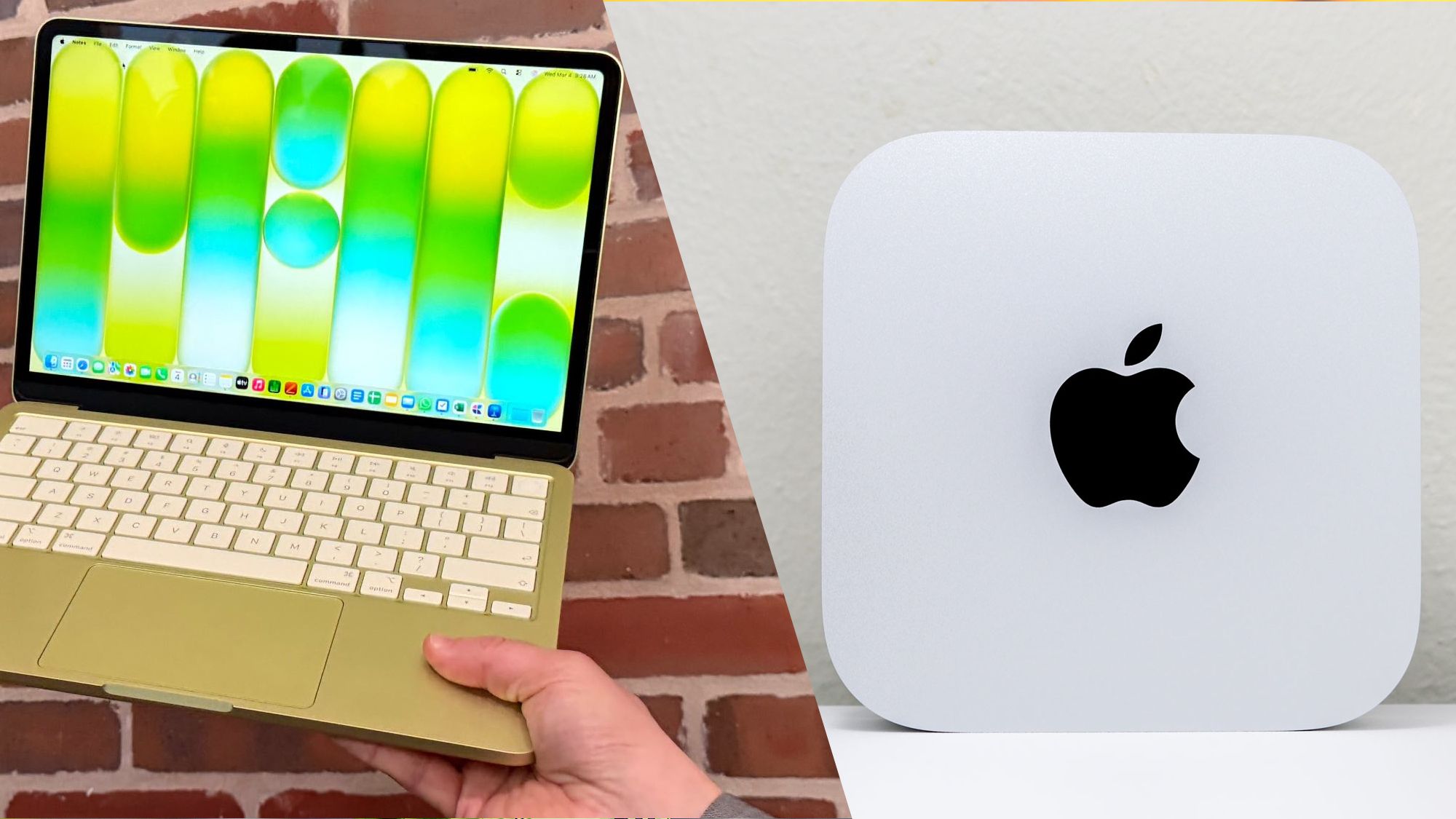
However, it’s not your only option at this price point. Released back in 2024, the Mac mini M4 also starts at $599 (with that same education discount available). Sure, you will need a separate monitor along with a keyboard and mouse but chances are, you probably already have a display and your existing peripherals will likely work with macOS.
While the MacBook Neo is arguably the best budget laptop you can get right now, the Mac mini M4 is one of the best mini PCs overall. If you don’t plan on bringing the Neo with you and will mostly be using it at home, then the Mac mini M4 becomes a much more compelling option. Then it just comes down to whether or not you prefer to be anchored to a desk or sitting on the couch when using your computer.
Although you’re paying $599 for either machine, one comes equipped with a mobile chip while the other uses a full-blow desktop chip that’s significantly more powerful. Article continues below Now that we’ve tested and reviewed the MacBook Neo, we can see how it stacks up against Apple’s smallest Mac mini yet. If you only have $599 to spend on a new Mac, read this first before you rush out and buy the Neo as the Mac mini M4 is an equally impressive machine.
MacBook Neo vs Mac mini M4: Specs MacBook Neo vs Mac mini M4: Design The design of these two Macs couldn’t be more different. While the MacBook Neo is a 13-inch laptop, the Mac mini M4 is a compact mini PC that Apple redesigned in 2024 to be its smallest Mac ever. Despite being the most affordable MacBook yet, the Neo borrows quite a lot from the aesthetic of the MacBook Air.
It sports a fanless design, an ultra-thin chassis made from aluminum and comes with rounded corners for a more modern look.
In addition to Silver, the Neo is also available in three vibrant shades: Blush (pink), Indigo (deep blue), and Citrus (yellow).
Meanwhile, like other desktop Macs, the Mac mini M4 only comes in Silver. At 2.7 pounds, the Neo is very light and extremely portable which makes it easy to slip into a backpack. On the other hand, the Mac mini M4 is technically lighter at just 1.5 pounds.
However, since you’ll need a monitor along with a keyboard and mouse, it’s not nearly as easy to bring with you. On the MacBook Neo, you get two USB-C ports and a headphone jack on the left side of the laptop with no ports on the right side at all. Unlike with the previous model, Apple decided to add ports to the front of the Mac mini M4 and just like on the Neo, there are two USB-C ports as well as a headphone jack.
Around back though, the Mac mini M4 comes equipped with three Thunderbolt 4 ports, an HDMI port, a gigabit Ethernet port and a power port. When it comes to power, the Mac mini M4 can only be powered using the AC port at the back and the included power cable. The Neo comes with a compact 20W charger and is capped at a slower charging speed so you can’t use a higher-wattage one to quickly charge it.
You can use either of the Neo’s USB-C ports for charging.
However, the front one is the better option for charging as it’s a slower USB 2.0 port while the one at the rear is USB 3 and can be used to connect to an external display or for an external SSD. The keyboard on the Neo feels great to type on with 1mm of travel but it isn’t backlit. On the base model, you also don’t get Touch ID like on more expensive MacBooks.
If you want to use your fingerprint to login or for authentication instead of entering your password, then you’re going to need to spend an extra $100 on a Neo with this functionality and extra storage. Likewise, the Neo has a mechanical trackpad instead of a Force Touch one like on the MacBook Air. MacBook Neo vs Mac mini M4: Performance Performance varies greatly between the MacBook Neo and the Mac mini M4, as they’re powered by entirely different classes of silicon.
While the Mac mini uses the desktop-grade M4 chip, Apple brought the Neo’s price down to $599 by using the A18 Pro — the same mobile processor that powered the iPhone 16 Pro back in 2024.
In our lab tests, both chips showed comparable single-core performance. This means for 'burst' tasks like opening apps or loading a heavy webpage, both Macs will feel equally snappy.
However, the Mac mini M4 pulls ahead in multi-core workloads, making it the superior choice for video editing or heavy multitasking. The biggest performance divider isn't just the chip, but the memory. The $599 Mac mini M4 ships with 16GB of RAM as standard, whereas the Neo is stuck with 8GB and there’s no way to upgrade.
In our real-world stress test, the Neo began to struggle once we hit 20 open browser tabs, leading to sluggishness and tab reloads. The Mac mini, with double the memory, handled twice that load without breaking a sweat. Thermals also play a big role when it comes to performance.
The Neo’s fanless design makes it completely silent, but it will eventually throttle or slow down during long 4K video exports or heavy gaming sessions to stay cool. The Mac mini M4 features an internal fan that, while near-silent, allows it to maintain peak performance indefinitely. MacBook Neo vs Mac mini M4: Display The MacBook Neo has a 13-inch LED-backlit panel with a 2408 x 1506 resolution at 219 pixels per inch (ppi).
As such, it meets Apple’s “Retina” standard and it’s also quite bright at 500 nits. Still, even with this extra brightness, you’re better off using it indoors since it has a glossy finish and you can’t upgrade to Apple’s Nano-Texture glass option like you can with more expensive MacBooks. With only one high-speed USB-C port, you’re limited to connecting the Neo to a single external display.
Likewise, you’re also stuck at 60Hz which means you won’t be able to take full advantage of high refresh rate monitors that go up to 120Hz — like Apple’s new Studio Display XDR — or even higher. You don’t get a display with the Mac mini but thanks to the power of the M4 chip driving it, you can connect up to three external displays at the same time. When it comes to their resolution, you can run two displays at 6K at 60Hz and a third at 5K at 60Hz over Thunderbolt 4.
There’s also an HDMI port around back that can output at 4K at 60Hz.
Source Verification
Corroboration Score: 1This story was independently reported by 1 sources. Click any source to read the original article.